Hi, I’m Valerio, software engineer and CTO at Inspector.
Whether you’ve looked at async/await and promises in javascript before, but haven’t quite mastered them yet, this article aims to help you to better understand the real effects of the Nodejs async engine on your code execution flow.
Furthermore we’ll do it visually, navigating the code execution flow in real-time thanks to Inspector. At the end of the article you’ll find a really interesting video talk to test the asynchronous execution in nodejs by yourself.
Synchronous Programming
In traditional programming languages, most operations happen synchronously. If you think about PHP, and about how you would read a file using PHP, you would end up with something like this:
echo "Start reading the file...";

$content = file_get_contents('./export.csv');

echo $content;

echo "End of the script...";
The main thread will be blocked until the file is read, which means that nothing else can be done in the meantime, so we are sure that the script will echo the content of the file.
When you execute a synchronous script, you wait for each task to finish before moving on to another task.
Start reading the file...
#Content of the file
End of the script...
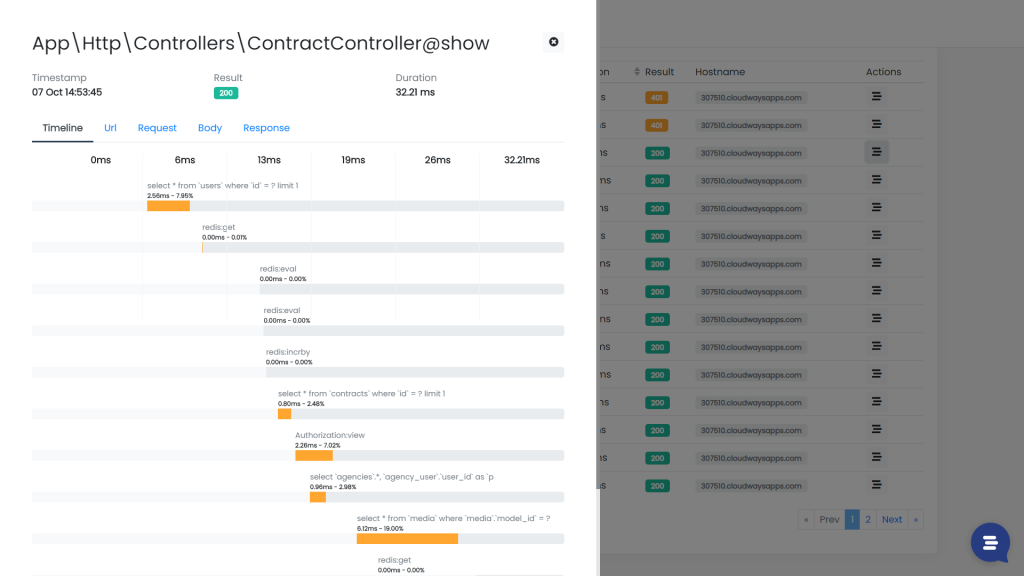
As you can see in the image below, this behaviour become clear taking a look to the code execution timeline of a Laravel application. The endpoint below runs a bunch of query against the database and the redis server, and each task has been executed sequentially, one after the other.
When a task is finished another one is executed until the end of the program.
Asynchronous programming
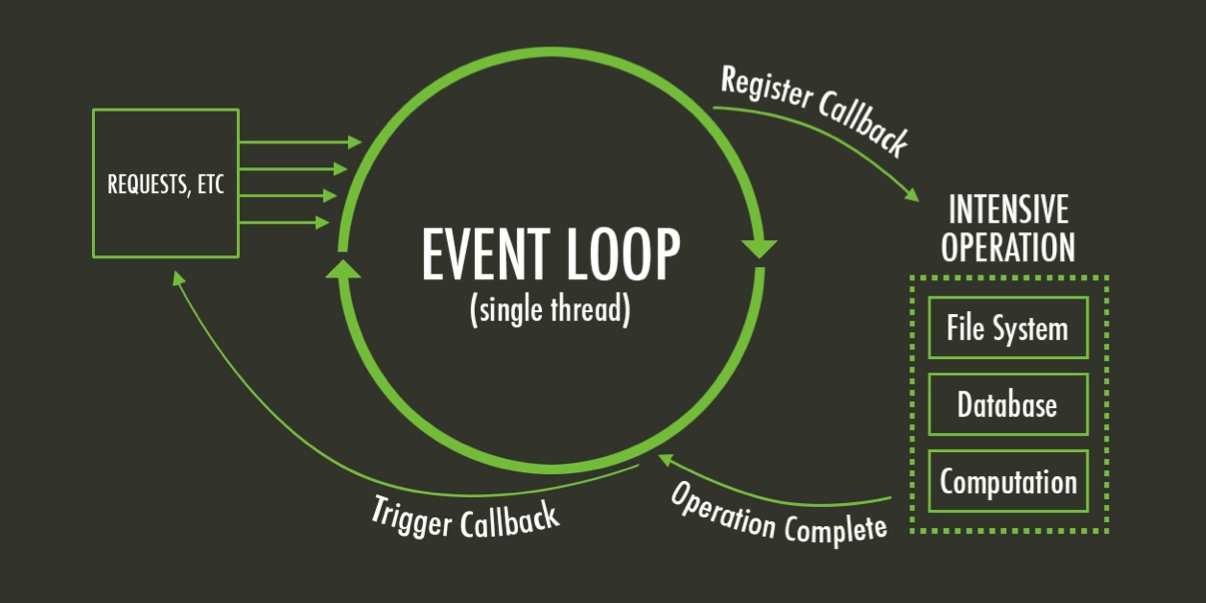
In an asynchronous environmet like Nodejs some tasks can be scheduled to be executed in parallel with the main script, leaving the main program to continue running subsequent tasks in the script.
Take a look on the following code example to read a file in nodejs:
const fs = require('fs')

console.log("Start reading the file...")

fs.read('./export.csv', function(err, content) {
    console.log(content)
})

console.log("End of the script...")
We read a file using the fs module, and the content variable is logged after “End of the script…” string.
Start reading the file...
End of the script...
#Content of the file
Once we started to read the file the execution continued, and the application printed “End of the script…” first, and the callback was only called once the file read was finished.
We can see the parallel execution in anction using Inspector to have a visual representation of the code execution flow in an async context:

Where needed the tasks are executed simultaneously, each with its own duration. Code Execution Monitoring often allows us to become more aware of the behavior of the code we write. That’s why its adoption continue to grow in the Nodejs and Laravel communities.
To understand the async nature of NodeJs more in-depth, you need to absolutely watch this video:
Next Up: Your First Node.js Server
In the next chapter, you will learn how to deploy your Node.js server using Laravel Forge – in the meantime if you have any questions, don’t hesitate to ask!
Nodejs application monitoring
If you found this post interesting and want to drastically change your developers’ life for the better, you can give Inspector a try.
Inspector is an easy to use Code Execution Monitoring tool that helps developers to identify bugs and bottlenecks in their application automatically. Before customers do.
It is completely code-driven. You won’t have to install anything at the server level or make tedious configurations in your cloud infrastructure.
It works with a lightweight software library that you can install in your application like any other dependency. You can try the Nodejs module, it’s free.
Create an account, or visit our website for more information: https://inspector.dev